| Encoder | Hardware | Codecs | Notes |
|---|
| NVENC | NVIDIA RTX 30/40 series | H.264, HEVC, AV1 (RTX 40+) | Industry standard for live streaming |
| Quick Sync | Intel iGPU + ARC GPUs | H.264, HEVC, AV1 (ARC) | Bundled with Intel CPUs |
| AMF | AMD Ryzen iGPU + RDNA GPUs | H.264, HEVC, AV1 (RDNA3+) | Less common in production tools |
| Apple VideoToolbox | M1/M2/M3 Macs | H.264, HEVC, ProRes | Apple's native video acceleration |
For OBS Studio, DaVinci Resolve, FFmpeg, and most production tools: all three encoders are supported. The choice depends on your hardware.
For a 4K30 source at target 25 Mbps:
| Encoder | VMAF score | Encoding speed |
|---|
| libx264 (medium) | 92.6 | 1.0x realtime |
| libx265 (medium) | 93.8 | 0.4x realtime |
| NVENC H.264 (P7) | 92.4 | 25x realtime |
| NVENC HEVC (P7) | 93.5 | 18x realtime |
| QSV H.264 (slower) | 92.0 | 12x realtime |
| QSV HEVC (slower) | 93.2 | 9x realtime |
| AMF H.264 (Quality) | 91.5 | 8x realtime |
| AMF HEVC (Quality) | 92.8 | 6x realtime |
NVENC leads on H.264 and HEVC. Quick Sync is competitive on Intel ARC GPUs. AMF lags slightly but acceptable.
VMAF above 92 is "transparent" (most viewers don't notice compression). All three encoders cross this threshold at production bitrates.
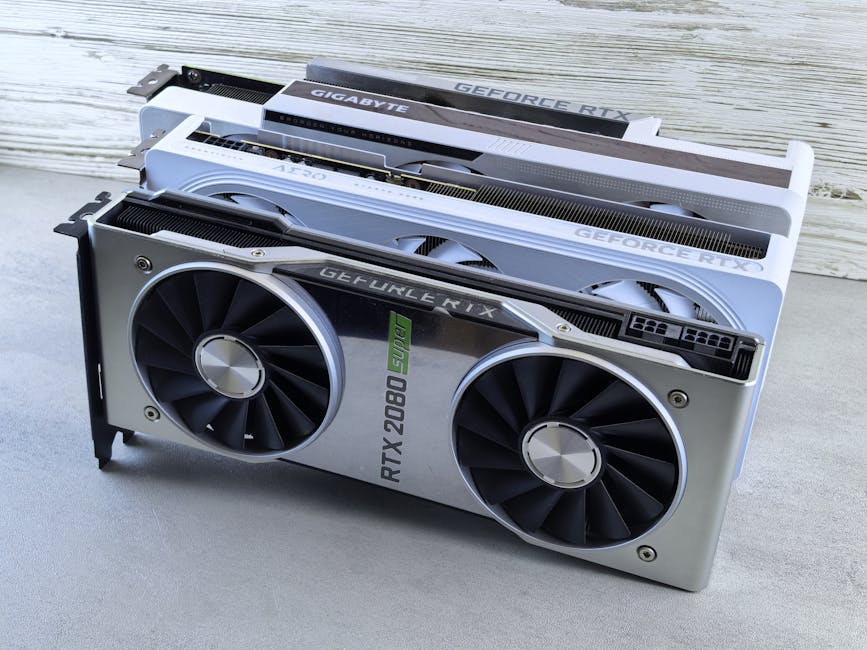
NVENC (NVIDIA Encoder) is the production standard for hardware encoding in 2026. The 8th generation (RTX 40 series) added AV1 encoding.
Quality tiers:
| RTX Generation | H.264 | HEVC | AV1 |
|---|
| RTX 30 series | Excellent | Excellent | Decode only |
| RTX 40 series | Best | Best | Yes |
| RTX 50 series (when released) | Best | Best | Yes (improved) |
For OBS Studio:
Settings > Output > Encoder: NVENC
Preset: P4 (Quality) or P7 (Best Quality)
Tune: High Quality
Multi-pass: Two Passes (Quarter Resolution)
Profile: high
Look-ahead: On
Psycho Visual Tuning: On
For FFmpeg:
ffmpeg -i input.mp4 \
  -c:v h264_nvenc -preset p7 -tune hq \
  -profile:v high -rc:v vbr -cq:v 22 \
  -spatial_aq 1 -temporal_aq 1 \
  -movflags +faststart \
  output.mp4
NVENC is the production default for live streaming on Windows, batch H.264 transcoding, and hardware-accelerated AV1 (RTX 40 series).
For OBS streaming context, see Twitch and OBS Bitrate Settings.
Quick Sync runs on Intel CPU iGPUs (8th generation+) and dedicated Intel ARC GPUs (since 2022). Quality has improved dramatically with newer generations.
Generations:
| Intel CPU/GPU | Quality |
|---|
| 8th-10th gen iGPU | Decent for H.264 |
| 11th-12th gen iGPU | Excellent for H.264, decent HEVC |
| 13th-14th gen iGPU | Excellent for both, AV1 limited |
| ARC A380/A580/A770 | Excellent for all, including AV1 |
For OBS Studio:
Settings > Output > Encoder: Quick Sync
Preset: slower
Profile: high
RC: ICQ
ICQ Quality: 22
Multipass: Full Quality
For FFmpeg:
ffmpeg -i input.mp4 \
  -c:v h264_qsv -preset veryslow \
  -global_quality 22 \
  -look_ahead 1 \
  output.mp4
Quick Sync is a great option if you have Intel CPU/GPU with no NVIDIA card. ARC A770 GPU offers AV1 encoding at competitive quality.
AMD's AMF (Advanced Media Framework) runs on Ryzen CPUs (with iGPU) and RDNA GPUs. Quality has historically lagged NVENC but improved with RDNA3.
Generation differences:
| AMD GPU | Quality |
|---|
| RX 5000 series | Decent for H.264 |
| RX 6000 series | Good for H.264, OK HEVC |
| RX 7000 series (RDNA3) | Excellent, AV1 supported |
| RX 8000 series (when released) | Continued improvements |
For OBS Studio:
Settings > Output > Encoder: AMF (or H264/HEVC AMF)
Quality: Quality
Pre-Pass Mode: Full Resolution
B-frames: 0 (improves quality on AMF)
For FFmpeg:
ffmpeg -i input.mp4 \
  -c:v h264_amf -quality quality \
  -rc:v vbr_latency \
  -qp_p 22 -qp_i 18 \
  -movflags +faststart \
  output.mp4
AMF is the choice if you have AMD GPU and no NVIDIA option. Quality on RDNA3+ is competitive with NVENC.
| Encoder | H.264 | HEVC | AV1 | VVC |
|---|
| NVENC (RTX 30) | Yes | Yes | Decode only | No |
| NVENC (RTX 40) | Yes | Yes | Yes | No |
| Quick Sync (iGPU) | Yes | Yes | Limited | No |
| Quick Sync (ARC) | Yes | Yes | Yes | No |
| AMF (RDNA2) | Yes | Yes | No | No |
| AMF (RDNA3) | Yes | Yes | Yes | No |
| Apple VideoToolbox | Yes | Yes | No | No |
For AV1 encoding specifically: RTX 40, ARC, RDNA3. For HEVC and H.264: all modern hardware.
For underlying VVC context, see VVC vs AV1.
For Twitch, YouTube Live, Kick:
| Resolution | Recommended encoder |
|---|
| 720p60 | Any (all handle this) |
| 1080p60 H.264 | NVENC RTX 30+ or QSV ARC |
| 1080p60 HEVC | NVENC RTX 30+ or QSV ARC |
| 1080p60 AV1 | NVENC RTX 40 or QSV ARC |
| 4K30/60 H.264 | NVENC RTX 40 |
| 4K30/60 HEVC | NVENC RTX 40 |
| 4K30/60 AV1 | NVENC RTX 40 (preset P4-P5) |
Hardware encoding is mandatory for live streaming above 1080p60 because software can't keep up with realtime.
For Twitch-specific bitrate guidance, see Twitch and OBS Bitrate Settings.
For batch transcoding (turning a library of MOV files into H.264 MP4):
for f in *.mov; do
  ffmpeg -hwaccel cuda -hwaccel_output_format cuda \
    -i "$f" \
    -c:v h264_nvenc -preset p7 -cq:v 22 \
    -c:a aac -b:a 192k \
    -movflags +faststart \
    "${f%.mov}.mp4"
done
The -hwaccel cuda -hwaccel_output_format cuda flag enables full GPU pipeline (decode AND encode on GPU, no CPU bottleneck).
For 100 files at 1080p, NVENC processes the batch in 1-2 hours. Software libx264 at "slow" preset takes 8-12 hours.
For batch processing patterns, see Batch Processing Files Guide.
Hardware encoder produces lower quality than expected: preset wrong. Use P7 for NVENC, slower for QSV, quality for AMF. Fast presets prioritize speed over quality.
OBS doesn't show NVENC option: NVIDIA driver outdated or unsupported card. Update to latest Game Ready Driver.
File size too large with hardware encoding: hardware encoders default to lower compression than software at same quality target. Increase CRF/CQ value for smaller files at slight quality cost.
Live stream stutters with NVENC: GPU memory pressure from game playing. Reduce game graphics settings or upgrade GPU.
Quality acceptable but file plays slowly on iPhone: Profile mismatch. Verify -profile:v high -level 4.0 is set.
For broader OBS context, see Twitch and OBS Bitrate Settings.
For batch work and archival masters: software (libx264 medium/slow) for best quality. For live streaming and real-time: hardware (NVENC/QSV/AMF) for the speed.
NVENC on RTX 40 series is the production sweet spot. ARC A770 is the best Intel option. RDNA3 is competitive AMD.
Twitch ingests HEVC selectively. YouTube Live ingests HEVC. Most streaming services H.264 by default for compatibility. HEVC saves bandwidth but supports fewer viewers.
For Mac users, VideoToolbox is competitive with NVENC. M2 and M3 Max chips deliver excellent ProRes and HEVC encoding. For PC: NVIDIA/Intel/AMD options.
Modern hardware encoders use dedicated silicon separate from gaming. NVENC on RTX 40 series has minimal impact on game framerate. Quick Sync runs on iGPU (separate from discrete GPU). AMF uses encoder block.
Yes. NVENC supports multiple simultaneous streams. Some FFmpeg pipelines run 2-3 encodes in parallel. Useful for batch transcoding at scale.
For hardware encoding: NVENC on RTX 40 for the best across-the-board quality. ARC A770 for Intel-based AV1 encoding. AMF on RDNA3+ for AMD systems. Always use slow/best presets for production work; fast presets sacrifice noticeable quality. Our video compressor handles software-encoding-equivalent quality for sources where speed isn't the constraint.